


Changing the query and altering search results on a WordPress website can greatly enhance a website’s user experience. The snippet of PHP code discussed in this post provides a simple yet effective tweak to the default WordPress search functionality, ensuring that both posts and pages are included in the search results. This approach not only streamlines the user experience but also ensures that valuable content, whether in posts or pages, does not remain hidden from your site visitors.
Understanding the Code
					function tutebucket_search_filter( $query ) {
    if ( $query->is_search ) {
        $query->set( 'post_type', array('post','page') );
    }    return $query;
}
add_filter('pre_get_posts','tutebucket_search_filter');
The function tutebucket_search_filter($query) is a custom function that modifies the query used by WordPress when performing a search. Here’s a breakdown of what each part of the code does:
- The function tutebucket_search _filter is defined with $query as its parameter, which represents the WordPress query object.
- The code checks if the current query is a search query with $query->is_search. This is crucial because the modifications should only affect search queries and not other types of queries like retrieving posts for the homepage or archives.
- If the condition is true, meaning it is a search query, the function modifies the query using $query->set(‘post_type’, array(‘post’,’page’));. This line instructs WordPress to look for both posts and pages, whereas the default behavior is typically to only search posts.
- After modifying the query, it is returned with return $query;, ensuring that the modified query is used for the search.
Adding the Function to WordPress
The code snippet is made functional by adding it to your theme’s functions.php file. Without disturbing your core theme files we can make a child theme and add this into your child theme’s functions.php file or we can use WordPress plugins to add this code to your theme’s functions.php. This is done through the line add_filter(‘pre_get_posts’, ‘tutebucket_search_filter’);, which hooks the tutebucket_search_filter function to the pre_get_posts action. This hook allows the function to run before WordPress executes the query, thereby altering the search results as needed.
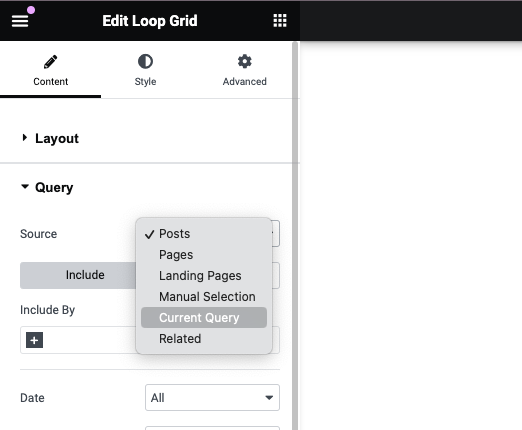
When using the Elementor website builder plugin (Loop grid widget), you can select the current query to display the returned query.
Benefits of Modifying Search Queries
Including both posts and pages in search results can significantly enhance the content discoverability on your website. This is particularly useful for sites with important content distributed across both posts and pages. By tweaking the search function, users can receive a more comprehensive set of results, making the site more user-friendly and efficient.